Let your agent drive the app
A coding agent with a shell drives the app through the agent jar's command line: one tool call per command, a JSON answer on stdout. This page walks a short session on Order Desk with the real answers, so you know what your agent sees.
1. Start the app with the agent
Section titled “1. Start the app with the agent”Start Order Desk as in Installation, on port 8770, and check it with session.
2. Give your agent the skills
Section titled “2. Give your agent the skills”Copy the three skills into your agent's skills directory; for Claude Code that is .claude/skills/ in your project. Skills says what each one covers.
cp -r swing-ui-agent/skills/swing-ui-* your-project/.claude/skills/Then ask in plain words: "Open a new order for Ada Shop Ltd and tell me what the cart shows."
3. What the agent does
Section titled “3. What the agent does”Every call has the same shape:
UI="java -jar target/swing-ui-agent-agent.jar --port 8770"$UI <tool> '<json arguments>'$UI tools lists the tools; $UI tools click prints one tool's arguments. The full list is on Tools.
Look first. A scoped snapshot returns the element tree, each element with a role, a name, its states and a ref:
$UI snapshot '{"window":"main","depth":3,"compact":true}'{"role":"app","children":[{"ref":"e1","role":"window","name":"Order Desk","children":[ {"ref":"e2","role":"menubar","children":[{"ref":"e3","role":"menu","name":"File"},…]}, {"ref":"e7","role":"button","name":"New order"}, {"ref":"e8","role":"button","name":"New order for a recent customer","tooltip":"New order for a recent customer"}, {"ref":"e9","role":"tabs","children":[{"ref":"e10","role":"tab","name":"Orders","state":["selected"],"truncated":true}]}, {"ref":"e11","role":"label","name":"Ready"}, {"ref":"e12","role":"label","name":"4 open orders"}]}], "size":{"nodes":13,"bytes":676,"scoped":true}}Act. Targets name what a user sees: a role and a name. The ▾ button opens a menu of recent customers; pick clicks down a path in the menu that shows:
$UI click '{"target":{"role":"button","name":"New order for a recent customer"}}'$UI pick '{"path":["Ada Shop Ltd"]}'{"passed":true,"action":"click(button 'New order for a recent customer')","message":"","ms":26,"recorded":{"action":"click","target":{"role":"button","name":"New order for a recent customer"}}}{"passed":true,"action":"pick([Ada Shop Ltd])","message":"","ms":86,"recorded":{"action":"pick","path":["Ada Shop Ltd"]}}Each action waits for the app to settle before it answers. recorded is the step as a test will replay it.
Act on a table. A table row is addressed by its cells, a cell by its column header:
$UI click '{"target":{"role":"table","row":{"Product":"A4 paper, 500 sheets"},"column":"SKU"}}'$UI click '{"target":{"role":"button","name":"Add to cart"}}'Read without acting. read returns one element, or one table row or cell. Here e46 is the cart table from the last snapshot:
$UI read '{"target":{"ref":"e46","row":{"index":0}}}'{"found":true,"node":{"role":"row","columns":["Product","Qty","Price","Line total"],"rows":[["A4 paper, 500 sheets","1","€4.90","€4.90"]]}}Check. expect checks an element without acting and retries until it holds or its timeout passes (10 seconds by default):
$UI expect '{"target":{"ref":"e46"},"cell":{"row":{"Product":"A4 paper, 500 sheets"},"column":"Qty","expected":"1"}}'Look at it. --out writes the PNG of a screenshot to a file:
$UI --out cart.png screenshot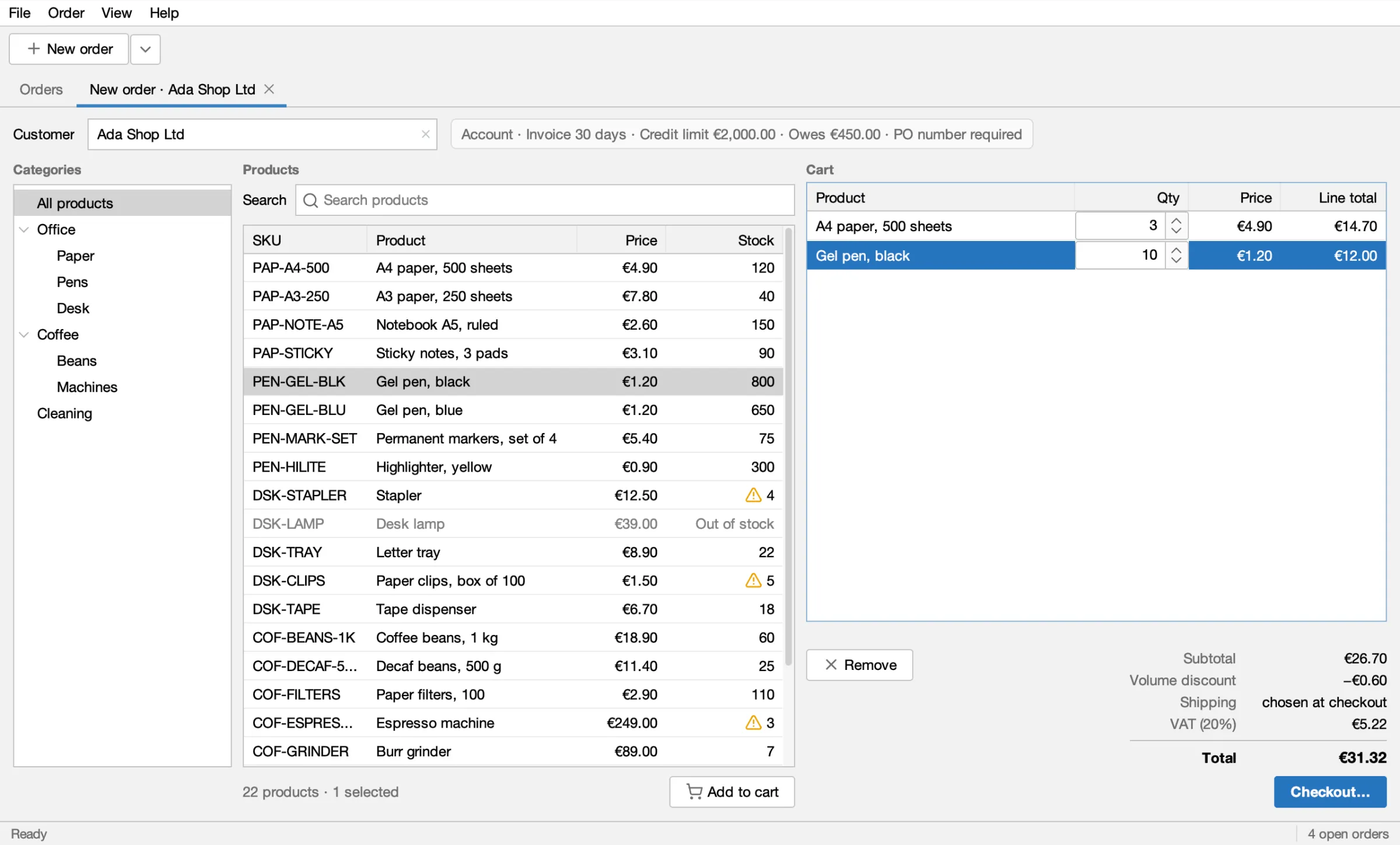
When a step fails
Section titled “When a step fails”A step that ran and failed still exits 0, with "passed":false, a reason and, when nothing matched, what does exist nearby:
$UI click '{"target":{"role":"button","name":"Add to basket"}}'{"passed":false,"action":"click(button 'Add to basket')","reason":"NOT_FOUND","message":"NOT_FOUND: nothing matches button 'Add to basket'", "details":["button 'New order' in main",…,"button 'Add to cart' in main [tab:New order · Ada Shop Ltd]","button 'Remove' in main [tab:New order · Ada Shop Ltd]","button 'Checkout…' in main [tab:New order · Ada Shop Ltd]"],"ms":10059}NOT_FOUND: nothing matches. Readdetailsand pick the right name.AMBIGUOUS: more than one element matches. Add ascope(such as["tab:New order · Ada Shop Ltd"]), awindowornth.EXPECTATION: anexpectdid not hold within its timeout. The message says what it found.
More on locators in Targets and locators.
Several steps in one call
Section titled “Several steps in one call”Once the next steps are certain, batch sends them in one call and stops at the first that does not pass:
$UI batch '{"steps":[ {"verb":"click","target":{"role":"table","row":{"Product":"Gel pen, black"},"column":"SKU"}}, {"verb":"click","target":{"role":"button","name":"Add to cart"}}]}'Over MCP
Section titled “Over MCP”An MCP client that speaks streamable HTTP connects to http://127.0.0.1:8770/mcp and gets the same tools. See CLI or MCP?.
What's next
Section titled “What's next”- Record a test with the agent: turn steps like these into a recorded test.
- Record a test by showing it: do the steps yourself in the app.
Apache-2.0 · A Kormcrete project · For coding agents:llms.txt, llms-full.txt